Admin Panel Guide
A complete walkthrough of the TeleMint Super Admin Panel.
Admin Panel Guide
The Super Admin Panel is the command center for your TeleMint SaaS. While the "App Panel" is used by your Creators to manage their individual stores, the Super Admin Panel gives you complete top-down control over the entire platform, including global revenue, creator payouts, Telegram infrastructure, and system settings.
1. Dashboard
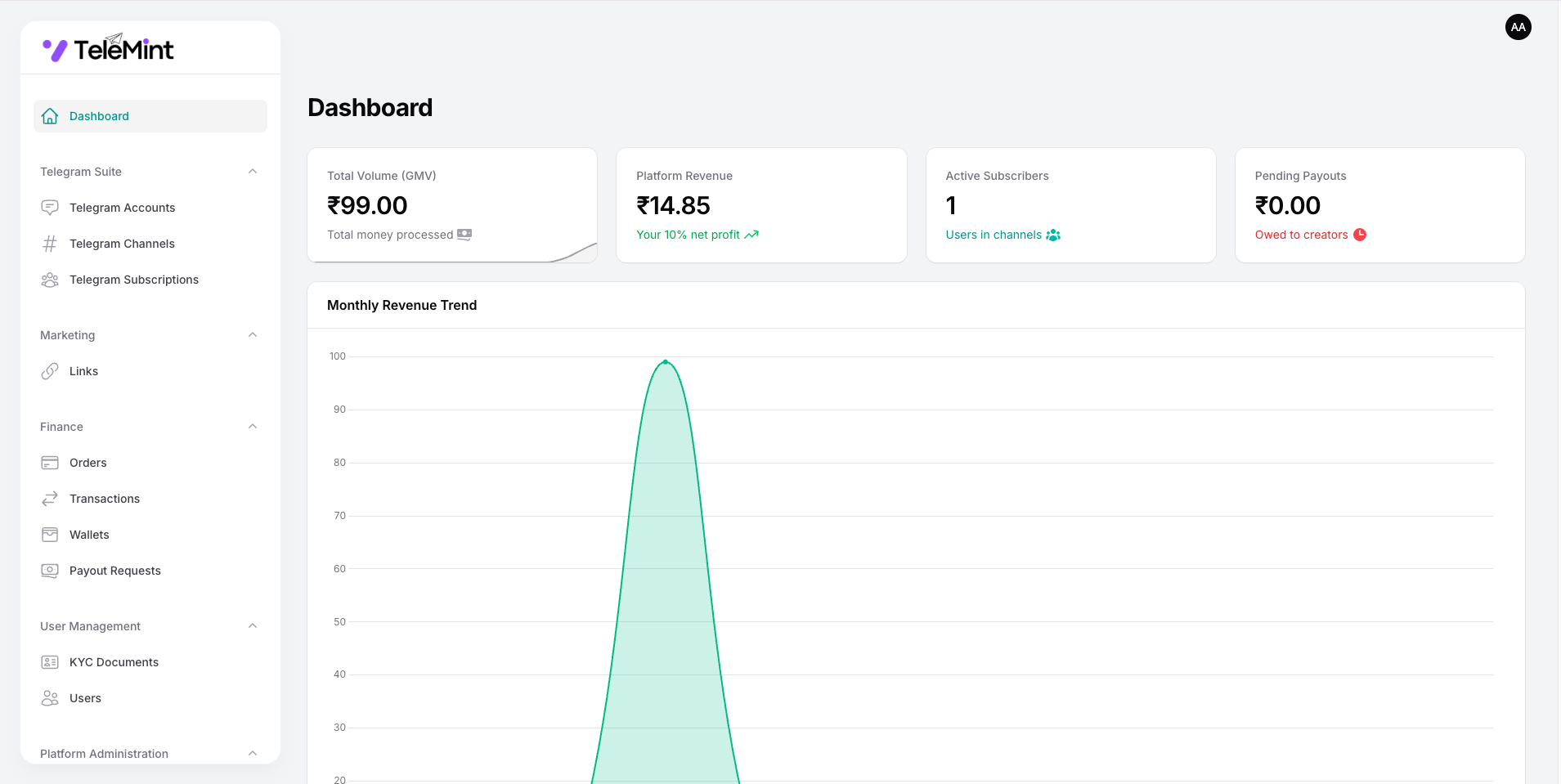
The Dashboard provides a clean, high-level overview of your platform's financial and operational health.
Key Metrics
- Total Gross Volume: Cumulative amount of money processed across all creator stores.
- Platform Earnings: Total revenue generated from your platform fees/commission.
- Pending Payouts: Total amount currently owed to creators requesting withdrawals.
- Active Creators: Total number of registered sellers currently utilizing the platform.
- Overview Chart: Visual data of platform growth and transaction volume over time.
2. Creator/User Management
Manage the sellers/creators utilizing your platform to run their businesses.
Status Overview
- Active: Creators with active storefronts and connected Telegram sessions.
- Unverified: Users who have registered but haven't completed email verification.
- Suspended: Creators banned for violating platform policies.
Actions
- View/Edit: Inspect a creator's details, connected Telegram account, and total sales.
- Suspend/Ban: Immediately freeze a creator's store and prevent them from accessing the platform.
3. Payout Management (Withdrawals)
Since TeleMint acts as the payment facilitator, creators will request their earnings through the platform. This module is vital for your daily operations.
Request Statuses
- Pending: New requests waiting for your approval.
- Processing: Requests you are currently fulfilling.
- Completed: Payouts successfully sent to the creator's bank and wallet.
- Rejected: Denied payouts (with an optional reason sent to the creator).
Actions
- Review Request: See the requested amount, the creator's payout details (e.g., Bank details, USDT address), and their available balance.
- Mark as Paid: Confirm the transfer was successful to deduct the balance from their ledger.
4. Global Transactions
A centralized ledger of every single transaction happening across your SaaS.
- Global Search: Find any transaction by Order ID, Buyer Email, or Creator Name.
- Transaction Details: View the purchased digital product or Telegram subscription plan, the exact timestamp, and the payment gateway used.
- Refunds: Process or log refunds for disputed transactions.
5. Telegram Infrastructure & Cron Jobs
Manage the automated background tasks that power the MadelineProto Userbot system.
Cron Job Setup
The heart of TeleMint's automation is the Auto-Kicker. You must set up the cron job on your server to ensure expired subscribers are automatically removed from creator channels.
- Command Guide: Provides the exact
telemint:kick-expiredArtisan command to add to your server. - Session Monitor: View the status of physical MadelineProto sessions (
.madelinefiles) stored on your server to monitor disk space.
Important: Without configuring the Cron Job, buyers whose subscriptions have expired will remain in the creators' private Telegram channels indefinitely.
6. Payment Gateways (Multi-Gateway Support)
Monetize your platform globally with built-in multi-payment gateway support.
- Configuration: Input your API Keys (Client ID, Secret Key, Webhook Secrets) for your supported payment processors (e.g., Stripe, Razorpay, PayPal, Crypto/USDT).
- Environment Toggles: Easily switch between
Sandbox(Testing) andProduction(Live) modes. - Activate/Deactivate: Turn specific gateways on or off globally with a single click.
7. Global Platform Settings
The core configuration area for your system. These settings directly influence the Filament environment we built.
General Settings
- Platform Name: Change the global brand name (updates dynamically across all panels).
- Platform Logo: Upload your primary logo (automatically handles Dark Mode inversion).
- Email Verification: A strict toggle to Enable/Disable mandatory email verification for new creators before they can access the App Panel.
Mail Settings (SMTP)
- Configure your global SMTP credentials (Host, Port, Username, Password).
- Note: The system intelligently suppresses email verification prompts if SMTP is not properly configured.
Payment Gateways (Platform Level)
- Configure the master API keys (Stripe, Razorpay, etc.) used to collect payments from buyers on behalf of your creators.
8. Multi-Language & Appearance
TeleMint is built for a global audience with a premium UI.
- Language Manager: Manage the available translation strings for the Filament interface. The middleware automatically adapts to the user's locale.
- Theme Enforcement: While creators can toggle Dark/Light mode freely, you can set the default fallback theme for new visitors.
9. Multi-Admins
Scale your operations by adding admins to manage support and payouts.
- Create Admin: Issue credentials for co-founders with full Super Admin permissions.
10. Frontend CMS (Custom Pages)
Control the public-facing landing page and informational pages of your SaaS without touching any code.
- Dynamic Pages: Create custom pages such as Privacy Policy, Terms of Service, Refund Policy, or About Us.
- Rich Text Editor: Format your page content easily using the built-in WYSIWYG editor.
- SEO Control: Add custom URL slugs, titles, and descriptions for better search engine ranking.
11. Contact Messages (Frontend Inquiries)
Manage all communication coming from the Contact Form on your public landing page.
- Inbox: View all submitted inquiries, including the sender's name, email, and message.
- Status Tracking: Mark messages as
Unread,Read, orResolved. - Quick Actions: Easily copy the sender's email to reply directly from your support inbox.